




Equipment scheduling software
Equipment scheduling software that gives every team member real-time visibility over shared assets

Stop Losing Gear. Start Keeping Work In Motion.

Equipment goes missing. Bookings clash. Maintenance slips. Cheqroom's Equipment Scheduling Platform gives your team full visibility over every asset — who has it, where it is, and when it's coming back.

Trusted by 1,400+ organisations · $5B+ in assets managed · 4.5★ on G2 & Capterra · SOC 2 Type II certified
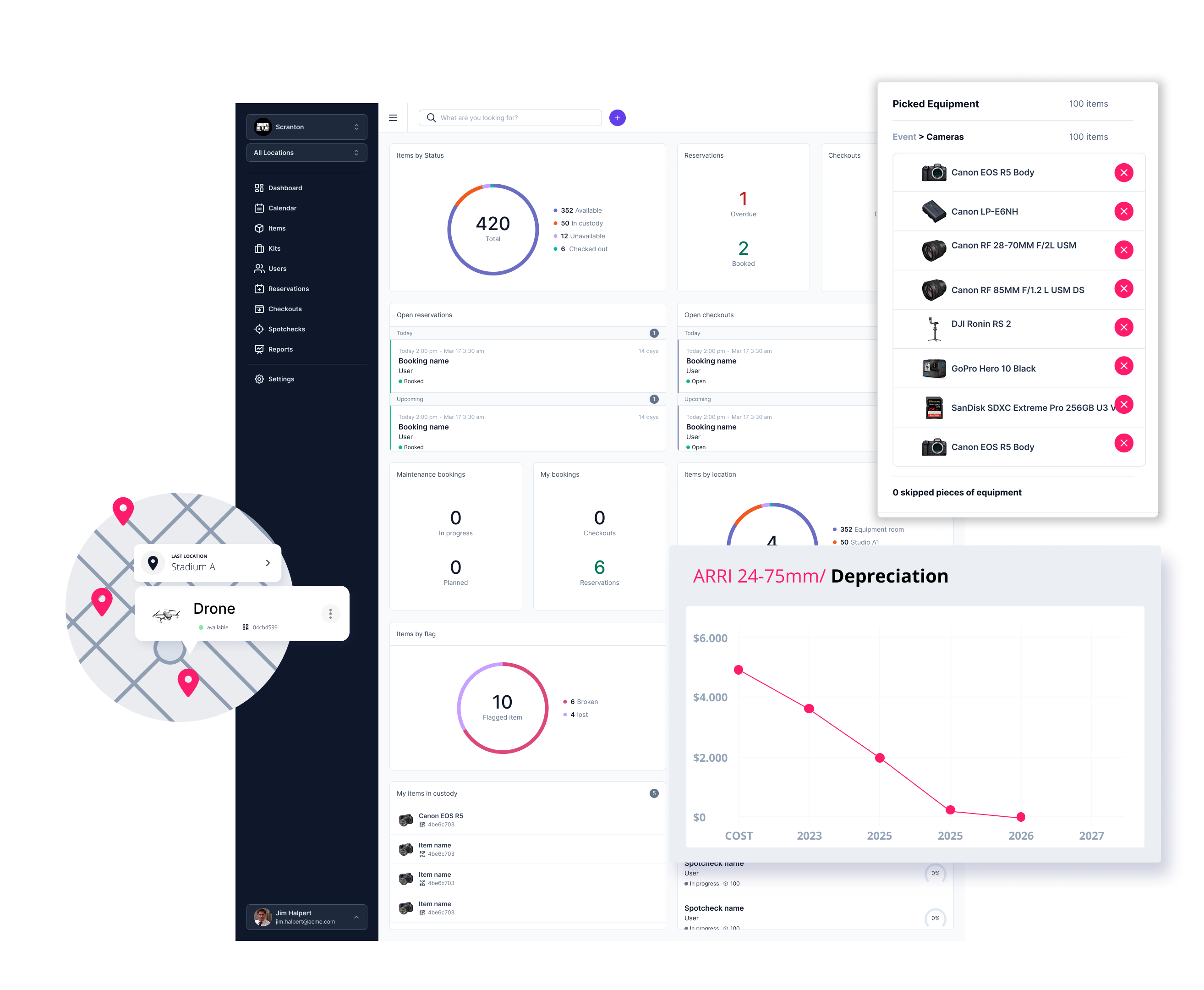
Equipment Tracking Dashboard

What is Equipment Scheduling Software?

Equipment scheduling software is a centralized platform that lets teams book, track, and manage shared physical assets in real time — preventing double bookings, monitoring check-outs and returns, and giving managers full visibility over every item across locations

Tracking Media Entertainment AV

Why Teams Choose Cheqroom For Equipment Management

Cheqroom is purpose-built for organisations where physical assets are mission-critical. Unlike generic asset management tools or spreadsheets, it is designed specifically for equipment that moves — checked out, returned, maintained, and redeployed continuously across teams and locations.

Teams using Cheqroom report a 45% reduction in equipment loss, a 40% extension in average asset lifetime, and save more than 80 hours per month on manual tracking and coordination. Most small teams are up and running within 24–48 hours — with workforce-wide participation from day one.

Key Features of Cheqroom's Equipment Operations Platform

No more double bookings

Reservations are made, tracked, and locked in one place. Conflicts are caught automatically before they become someone else's problem. When an item is already checked out or reserved, it is immediately flagged as unavailable — removing the risk of two people showing up for the same piece of gear.

Real-time equipment visibility

Instantly see which items are available, reserved, checked out, or under maintenance — all from one screen. Plan ahead, prepare check-outs in advance, and make sure the right equipment reaches the right person at the right time. The equipment schedule gives operations managers an instant read on everything in motion across the entire team.

Accountability built in

Every check-out, return, and modification is logged against a named user. Administrators can set role-based permissions to control who can book, edit, or access specific equipment categories — creating a full audit trail for every asset from procurement to disposal.

Automated reminders. Fewer delays.

Automated notifications remind users when equipment is due back, reducing delays, loss, and last-minute scrambling. Integrate with your calendar and let the system do the follow-up. No more chasing people down the hallway.

Maintenance management that keeps gear in rotation

Flag items under maintenance and remove them from the available pool until cleared. Damage reports are logged against the item and the responsible user, giving managers the documentation they need for repair decisions, insurance claims, or replacement planning.

Reports that make the case for you

Which items get the most use? What needs replacing? Where is the budget going? Cheqroom's reports turn raw equipment data into insights you can act on — utilisation rates, depreciation, peak demand periods, and asset value at a glance. Export to PDF in one click and walk into any budget conversation fully prepared.

Used by media production teams, universities, AV departments, and enterprise operations teams managing hundreds of shared assets.

Trusted by teams that can't afford downtime

“The calendar feature is my favorite, it gets us ahead of scheduling conflicts despite the limited equipment supply and enables us to take the necessary steps to outsource equipment when we need to.” - Mike McLaughlinWhistle Sports⁠

Logos website 28 05 2024 5x1

Ready To Take Control Of Your Equipment?

No more double bookings. No more missing gear. No more chasing people down.

Book a demo and we'll show you exactly how it works 
for your team.

FAQs

  • Spreadsheets require manual updates, don’t reliably prevent scheduling conflicts, and break down as teams and inventories grow. Equipment scheduling software centralizes reservations with real-time availability, helps surface conflicts early, sends overdue/return reminders, lets teams flag maintenance issues, and keeps a trackable history of bookings, checkouts, and asset status—so your schedule matches what’s actually happening.

  • Any team that shares physical assets benefits from equipment scheduling software. Common use cases include media and video production, broadcast and news teams, university AV and IT departments, corporate IT and technology teams, and field operations teams managing drones, cameras, or other specialist hardware.

  • Yes. Cheqroom automatically detects and blocks conflicting reservations in real time. When an item is already booked or checked out, it is flagged as unavailable — removing the risk of two people showing up for the same piece of gear.

  • Yes. Cheqroom integrates with popular calendar applications so users can sync equipment reservations with their existing workflows and receive notifications/reminders for upcoming bookings and overdue gear.⁠

  • Cheqroom supports clear custody and a trackable history for each item — including who reserved it, who checked it out, and key activity over time. Admins can also set role-based permissions to control who can book, edit, or access specific equipment categories, creating a consistent audit trail that helps teams stay accountable at scale.⁠

  • Cheqroom lets users flag items (e.g., “Needs repair” or “Under maintenance”), automatically removing them from availability until the issue is cleared. Issue details stay attached to the item’s history, along with the relevant booking/check-out context, so managers have the documentation they need for repair decisions, insurance workflows, or replacement planning.

  • Cheqroom pricing is designed to scale with your operation—based on the level of admin control you need—so you don’t get penalized as your inventory or user base grows. Cheqroom uses an admin-license pricing model (unlimited end users), and you can visit our pricing page to get an estimate.