Ever had that moment? You're ready to rock a project, only to find the one piece of equipment you need is AWOL. Meanwhile, it’s probably gathering dust in someone else's corner of the office, like a forgotten gym membership. This common struggle isn't just annoying; it's a silent killer of productivity and a champion of department silos.
The good news? You can kick those logistical headaches to the curb. We’ve found that the secret to happy, collaborative teams isn't buying more stuff, it's sharing the stuff you already have, smarter. Here are five proven models for equipment sharing, from the charmingly simple to the impressively high-tech.
1. The Manual Sign-Out Sheet: The OG of Equipment Sharing
Ah, the classic. Before apps and cloud-based systems, there was the sign-out sheet. It's the equipment sharing equivalent of a handshake agreement, and honestly, for a tiny team with just a few gadgets, it can work. For a bit.
How it works:
- Someone grabs a pen, jots their name down on a laminated sheet or a shared spreadsheet, and promises to bring the gear back. It’s all very "I swear on my honor."
Best for:
- Baby teams: Teams so small you could fit them all in a Mini Cooper.
- Low-stakes gear: Things that aren't a huge deal if they vanish for a day (or get a coffee spill on the sheet).
The punchline: This model is adorable until your inventory grows and someone "forgets" to sign back in, leaving everyone to play detective. It's a great starter pack, but it's not built for the big leagues.
2. The Booking Calendar: Your Equipment Gets a Schedule
If your team is into planning, a shared calendar is the natural next step. It’s like giving your equipment a personal assistant to manage its appointments.
How it works:
- Each piece of shared gear gets its own calendar. Need the fancy projector? Just check its calendar, book a slot, and you’re all set. No more shouting, "Is anyone using the projector?!" across the office.
Best for:
- The planners: Teams that need to schedule resources in advance, like for meetings or photo shoots.
- High-demand items: The popular kids of the equipment world, like the meeting room or the high-end drone.
The catch: The calendar knows when an item is booked, but it has no clue if it's been returned, if it's broken, or if it's currently at someone's house. It's a reservation system, not a tracking system.
3. The Admin Controlled Hub: The Gatekeeper with the Keys
For equipment that’s expensive, complicated, or super important, you don't want a free for all. This model puts an expert in charge a single point of contact who controls everything like a benevolent dictator.
How it works:
- You submit a formal request. The admin reviews it, makes sure you're properly authorized, and hands over the gear with a majestic nod. When you're done, they inspect it with the vigilance of a hawk before checking it back in.
Best for:
- The pricey stuff: Think expensive cameras, specialized lab gear, or anything that requires a safety briefing before use.
- Maximum control: When compliance and security are non negotiable.
The hitch: This system is incredibly secure, but it can create a serious bottleneck. If the admin is busy, you're stuck. It's like waiting in line for a ride at an amusement park with only one person to operate it.
4. The Self-Service Revolution: Trusting Your Teams
Modern work is all about empowerment, and this model takes that to heart. It’s the "trust me, I got this" of equipment sharing, powered by smart tech.
How it works:
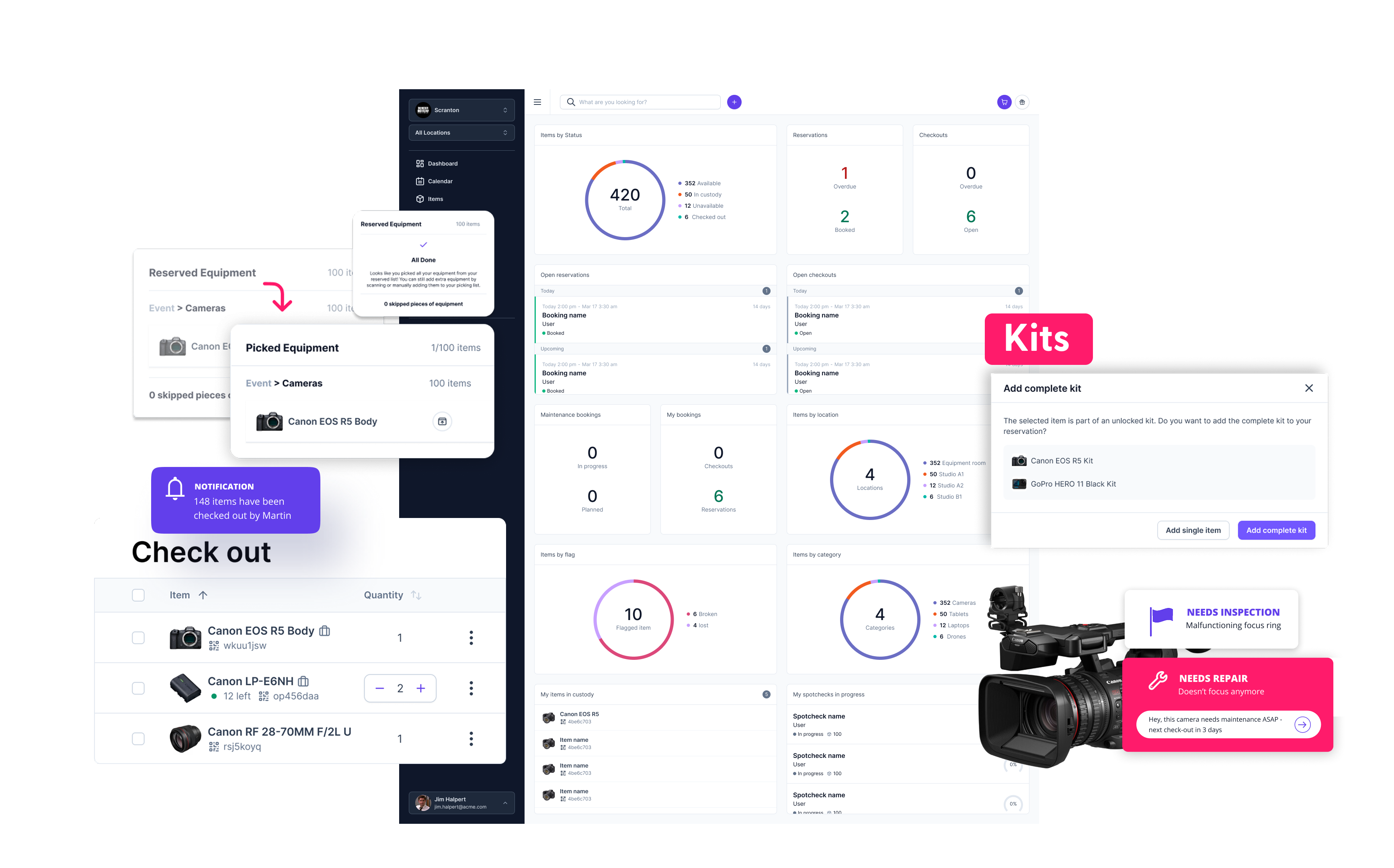
- You use a web portal or an app to browse what's available in real time. Find what you need, hit “reserve,” then scan a QR code on the item itself to check it out. The system does the rest, logging everything so no one has to.
Best for:
- The high volume gear: Laptops, monitors, simple tools, anything everyone needs a piece of.
- Efficiency junkies: Companies that want to slash admin work and speed up access.
The fine print: This model only works if you have a great software solution. Without it, you’re just giving people the keys to the kingdom without any way to track who's in which room.
5. The Hybrid Approach: The Perfect Mix
Why choose one when you can have the best of both worlds? The hybrid model is the ultimate compromise, blending the security of an admin-controlled system with the convenience of self-service.
How it works:
- An admin might handle the initial check-out for a complex, high-value drone, making sure it’s in perfect condition. But for common items like a tripod or a battery pack, you just use the app to check them out yourself. Plus, if you find a broken power cord, you can report it instantly through the system without having to track down an admin.
Best for:
- The flexible office: Organizations with a wide variety of equipment, from simple to complex.
- Gradual transitions: Perfect for those moving from a traditional system to a more modern one without jumping in all at once.
How Cheqroom Connects All the Dots
These models are great in theory, but in practice, they often break down. The manual systems become a chore, and the more advanced ones need serious software to back them up. This is where Cheqroom comes in, acting as the ultimate maestro for your equipment orchestra.
Cheqroom doesn't just support these models, it makes them effortless.
- For the manual folks: Cheqroom lets you start with a simple digital inventory. It’s the easiest way to ditch the paper and give your team a taste of what seamless tracking feels like.
- For the gatekeepers: Cheqroom provides the central command center for admins to manage every detail, from who has what to when an item needs maintenance. It’s all the control you need, without the bottleneck.
- For the self-starters: Our intuitive mobile app turns any team into a self-sufficient equipment powerhouse. Just scan, grab, and go. It’s that easy.
- For the hybrid heroes: Cheqroom is infinitely configurable. You can set up different rules for different types of equipment, so your high-end gear gets the white-glove treatment while your everyday items are fully self-service.
Ready to stop the great equipment search and start collaborating like a well oiled machine?
Find out how Cheqroom can turn your equipment from a logistical nightmare into a strategic advantage.