Which Equipment Management Software Wins?
If your team manages shared gear—cameras, laptops, demo kits, tools, or high-value equipment—choosing the right platform is the difference between smooth checkouts and daily chaos.
When it comes to Cheqroom vs Asset Panda, both platforms offer asset tracking, but they’re built with different priorities in mind. And when equipment moves across teams, locations, and projects, those differences can have a real impact on daily operations.
In this guide, we’ll break down how Cheqroom and Asset Panda compare in the eight areas that impact day-to-day operations so that you can pick the best system for your team and your workflow.
1. Equipment Checkout & Booking Workflows
Checkout speed and booking clarity are where the real day-to-day differences show up. If your team is actively checking gear in and out, you’re not just buying a tracker; you need equipment management software that keeps up with real work.
Cheqroom
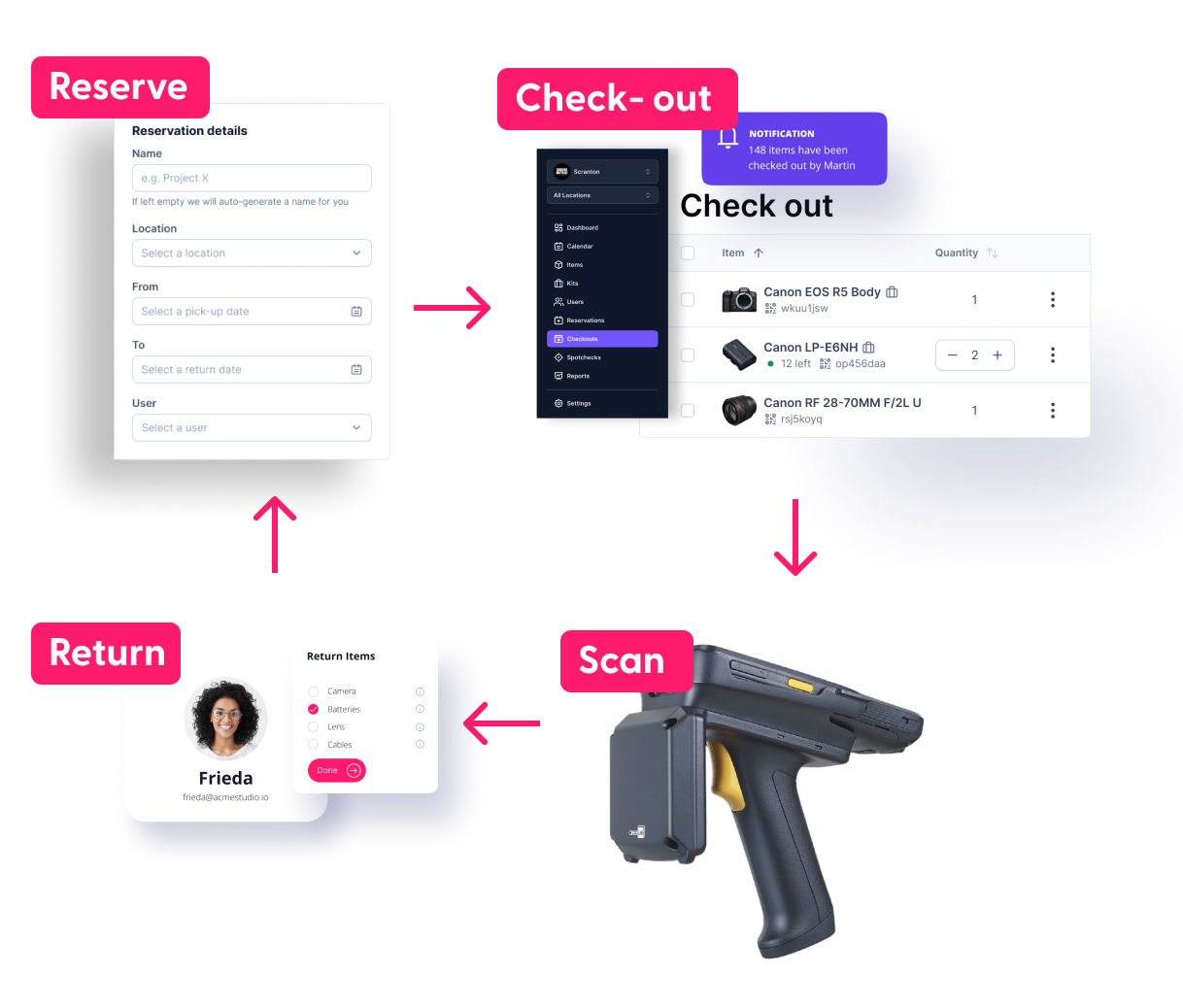
Cheqroom is built for fast, clear equipment checkout and booking workflows, with a structured lifecycle (reserve → assign → check out → return → track history) that helps prevent double bookings, missed returns, and accountability gaps. Its mobile barcode/QR scanning enables real-time updates in the field without manual workarounds.. This makes Cheqroom the faster, more purpose-built option for daily checkouts.
Asset Panda
Asset Panda supports reservations, assignments, and mobile access, but the checkout experience can feel more database-driven than workflow-driven out of the box.
While it can support scanning and tracking, teams with frequent checkouts may need additional setup and process design to keep booking, due dates, and returns streamlined, especially at higher volume.
2. Asset Tracking + Real-Time Visibility
Both platforms can track equipment, but the real question is how quickly your team can answer: “Where is it, who has it, and when is it coming back?”
Cheqroom
Cheqroom delivers strong asset tracking and real-time visibility because it’s built for day-to-day equipment movement, not just record-keeping. Teams can instantly see whether gear is available, checked out, reserved, or in maintenance, with multi-location visibility that makes it easy to know what’s where at a glance.
Location tracking stays clear and operational as assets are tied to a location, a person, and a booking timeline—so “where is it, who has it, and when is it back?” is answered quickly, even when multiple teams are sharing gear across sites.
Asset Panda
Asset Panda supports real-time asset tracking, availability statuses, and multi-location setups, but visibility can feel more database-driven than workflow-driven depending on configuration. The information is there, but it may take more clicks, setup, and internal consistency (fields, naming conventions, and update habits) to make location and status instantly obvious for everyday users.
It’s a capable option for organizations that want a centralized asset database and structured reporting, but answering 'where is it?' quickly often depends on how well the system is customized and maintained.
3. Barcode/QR Scanning/RFID + Tagging Experience
For teams managing shared gear, scanning isn’t a “nice-to-have.” It’s how you keep checkout fast, accurate, and scalable without relying on memory or manual entry.

Cheqroom
Cheqroom offers a fast, checkout-first RIFD / barcode/QR code scanning experience built for teams constantly moving gear. Tagging assets is straightforward, scanning is tightly integrated with real workflows (reserve, check out, return), and the process stays quick even when users handle multiple items or full kits with accessories.
Because scanning is designed to complete actions—not just pull up records—It reduces manual entry, minimize mistakes, and keep high-volume checkouts running smoothly.
Asset Panda
Asset Panda supports barcode scanning and tagging and can work well for teams building a structured asset-tracking system, especially across departments. However, scanning speed and simplicity often depend on configuration, which can add steps compared to a checkout-native tool.
It can still reduce manual work for audits and asset logging, but teams with heavy daily checkout volume may find the experience more database-driven unless it’s carefully set up for streamlined scanning.
4. Audit Trails, Accountability, and Reporting
If you’ve ever had a missing item, a damaged return, or a “no one knows who had it last” situation, you already know why audit trails matter. Both platforms support accountability, but they approach it a little differently depending on how your team works day to day.
Cheqroom
Cheqroom delivers strong audit trails and accountability by tying chain-of-custody history directly to real equipment workflows—reservations, checkouts, returns, and handoffs. When something goes missing or comes back damaged, you can quickly see who had it last, when it changed hands, and what happened—without slowing down operations. Reporting is typically geared toward fast, operational answers (what’s out, overdue, available, or underused), making it a great fit for teams that need audit-ready tracking without turning checkout into admin work.
Asset Panda
Asset Panda also supports accountability well, especially for organizations that want detailed activity logs showing who changed what and when across asset records. Its reporting capabilities appeal to teams that need more configurable outputs for internal stakeholders, audits, or formal documentation, though that flexibility can require additional setup to align with your processes.
For compliance-heavy environments that prioritize structured recordkeeping and deeper administrative reporting, Asset Panda can be a strong option, particularly when your workflows are built around database-style tracking and governance.
5. Maintenance Tracking & Asset Lifecycle Management
Maintenance is where equipment management software proves its value long after the “checkout” part is working smoothly. It's not just about where your gear is—it's about keeping it working, extending lifespan, and preventing costly downtime.
Cheqroom
Cheqroom makes maintenance tracking feel like a natural extension of daily checkout workflows, which is exactly what teams need when gear is shared, mobile, and constantly in use. It supports proactive, preventive maintenance so you can schedule service before equipment fails, while keeping a clear service history that answers practical questions fast: last inspection, recurring issues, repair frequency, replacement readiness.
With asset condition tracking and utilization insights built into the same system, Cheqroom helps teams reduce downtime, extend equipment lifespan, and protect high-value gear without adding extra admin burden.
Asset Panda
Asset Panda can support maintenance tracking and asset lifecycle management, especially for organizations that want a more configurable system for documenting repairs, inspections, and asset history. It’s a solid option for teams that prioritize structured recordkeeping and customization across asset records, but the experience may feel more database-driven than workflow-driven depending on setup.
For organizations with formal maintenance documentation needs and the internal process discipline to keep records consistently updated, Asset Panda can be effective. However, it may require more configuration to keep maintenance actions tightly connected to day-to-day equipment usage.
6. User Experience & Ease of Adoption
A platform can have every feature in the world, but if teams don’t use it, it won’t solve your checkout problems. In the Cheqroom vs. Asset Panda comparison, both tools can work well, but the day-to-day experience is where the difference really shows up.
Cheqroom
Cheqroom is built for fast, everyday equipment workflows, so it tends to feel intuitive right away, especially for the people actually checking gear in and out. The interface is clean, and visibility is instant: what's available, checked out, or overdue, which lowers the learning curve and helps teams adopt it quickly without extensive training. It balances accountability with speed, making it a strong choice for organizations that want high adoption and a system that doesn't feel like extra admin work.
Asset Panda
Asset Panda delivers a powerful, flexible experience that can work extremely well, especially for organizations that want deeper customization and more structured control over asset data. That flexibility can come with a steeper learning curve, and day-to-day users may depend more on admins to configure workflows, fields, and layouts before the system feels streamlined.
For teams that value configurability and administrative oversight (and have the time to set it up properly), Asset Panda can be a great fit, but it may feel less checkout-first out of the box compared to Cheqroom.
7. Integrations, API, and Scalability
As your organization grows, equipment tracking stops being a single-team problem and becomes a multi-department, multi-location operation. That’s when integrations, access control, and scalability matter just as much as check-in/check-out features.
Cheqroom
Cheqroom scales smoothly as equipment management expands across teams, departments, and locations, without turning daily checkouts into a slow, overly technical process. It supports integrations that help reduce duplicate data entry and keep workflows connected, while still staying focused on operational speed and usability.
With flexible role-based access and permissions that are easy to manage, Cheqroom gives admins the control they need without creating friction for everyday users. For enterprise rollouts where adoption, multi-site coordination, and fast booking workflows matter most, Cheqroom is the stronger fit.
Asset Panda
Asset Panda is a strong option for organizations that want asset tracking tied into broader IT, operations, or compliance-driven workflows, especially when reporting and structured data management are top priorities. It can scale effectively across departments, particularly in environments that require customization, custom fields, and formal processes.
Asset Panda also offers robust role-based access controls, which is a major advantage for strict governance needs, but it may require more setup and ongoing administration to keep everything running smoothly at scale. For enterprises that prioritize configurability and centralized control, Asset Panda can be a compelling choice.
8. Pricing
Cheqroom Pricing
Cheqroom’s pricing is tiered by feature set and organizational scale, with clear starting prices tied to administrator seats rather than end user count—meaning you can add unlimited users and items without incremental cost.
- Core: $184 admin/month - unlimited users/assets, 1 location, basic reservations & checkouts
- Business: $275 admin/month - unlimited users/assets, 3 locations, core + custom roles & reporting
- Enterprise: $367 admin/month - unlimited users/assets, 10 locations, business + multi-site coverage, integrations, and security features
Asset Panda Pricing
- Starter: $50 user/month - 1,000 assets
- Business: $60 user/month - 5,000 assets, integrations, multi-site coverage
- Enterprise: custom quote - unlimited users/assets
Overall, Cheqroom’s pricing tends to be more transparent and scalable—especially for teams with frequent checkouts and many users—while Asset Panda’s model offers flexibility but less clarity upfront.
Pros & Cons Summary (Cheqroom vs. Asset Panda)
| Platform | Pros | Cons |
|---|---|---|
| Cheqroom | • Fast equipment checkout + booking workflows • Strong real-time visibility (availability, status, location context) • RFID, Barcode/QR scanning built for high-volume use • Clear audit trails and chain of custody • Great user experience for everyday staff • Strong fit for multi-location teams and shared gear | • Less customizable for highly complex internal processes • Some enterprise environments may need deeper “ITAM-style” configuration |
| Asset Panda | • Highly configurable for custom asset tracking needs • Strong admin controls and structured data collection • Good fit for organizations with formal asset management requirements • Works well for compliance-heavy internal processes | • Can take longer to set up and optimize • Learning curve may be higher for everyday users • Daily workflows may feel slower for teams doing frequent checkouts • Adoption can suffer if the system feels “admin-first” |
Final Verdict: Cheqroom vs. Asset Panda (Which Should You Choose?)
The best choice between Cheqroom and Asset Panda comes down to how your team works day to day.
Here’s what matters most:
- Checkout speed: Who can book, scan, and return gear faster?
- Visibility: Can you instantly see what’s available and where it is?
- Accountability: Do audit trails and permissions prevent losses and disputes?
- Scalability: Will it stay easy as you add users, sites, and equipment?
For most teams managing shared equipment, especially across multiple locations, Cheqroom is the better fit. It’s built for high-velocity operations where equipment needs to move quickly, stay trackable, and remain fully accountable without creating extra admin work.

Want to see it in action?
Explore Cheqroom and request a demo to see how our software for asset management simplifies bookings, speeds up checkout, and keeps your gear under control.

Claire Strom | Program Marketing Lead
As the program marketing lead, she's the one who keeps Cheqroom's vision and our customers' needs in sync. She loves bringing new features to life and telling the world about the magic of how Cheqroom keeps work in motion.
Whether she is behind the scenes crafting a new strategy or in front of the camera sharing our customers' stories, her mission is to turn equipment operations into a superpower, one story at a time.
More blog articles