You already have a process. Maybe it's a sign-out sheet, a shared calendar, a policy about logging returns before the end of the day. And the gear still goes missing.
A camera kit comes back short a battery. A lens turns up in the wrong building three weeks later. A $2,000 piece of equipment is "probably with someone on the team," which is another way of saying no one actually knows.
The instinct is to tighten the rules. Add a reminder. Have the conversation again. But enforcement-based approaches to equipment accountability have a ceiling, and most teams have already hit it.
Gear goes missing when accountability depends on individuals making the right call under real operational pressure, and that's a design problem, not a discipline problem.
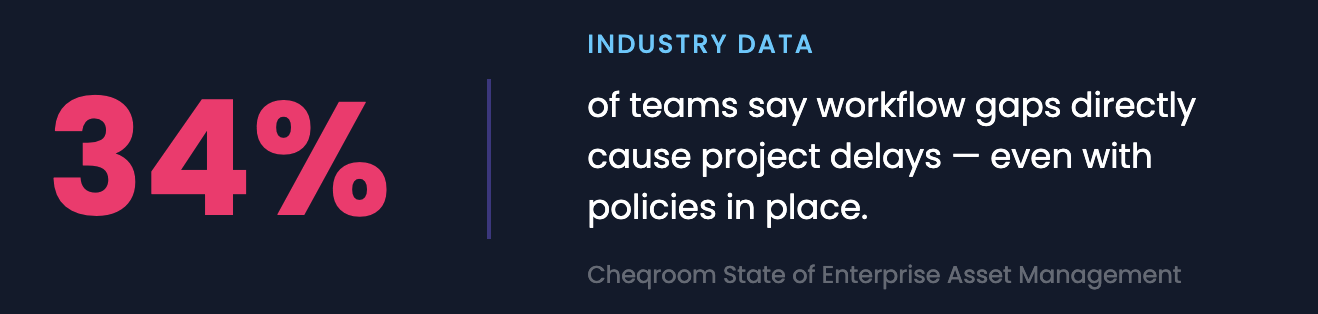
According to Cheqroom's State of Enterprise Asset Management report, 34% of teams say workflow gaps directly cause project delays. Those teams almost always have policies in place. The policies just aren't doing the structural work.
Why Enforcement-Based Accountability Has a Ceiling
Rules describe what should happen. They don't change what actually happens when someone is running between shoots, handling three requests at once, or assuming a colleague already logged the return.
Think about what accountability actually requires from someone operating under a process-based system. They need to log the checkout before they leave. Update the record when gear changes hands mid-project. Flag damage immediately, not at the end of a long shift. Do all of it accurately, every time.
Miss one step and the record is wrong. Miss a few, and it's useless.
A broadcast department can run a tight operation and still lose track of a wireless kit because two crew members assumed the other one handled the handoff log.
A university equipment room can have a clear sign-out policy and still find that returns go unlogged during peak semester rush.
A corporate AV team can send Friday reminders and still spend Monday morning piecing together what actually came back over the weekend.
The gap is between the policy and the conditions under which people actually work. That's the gap good equipment management software is designed to close.
What Accountability by Design Means in Equipment Management
Accountability by design means the record updates because of what happens, not because someone remembered to update it. The checkout creates the record. The scan closes it. The flag blocks the asset. No separate decision required at the moment of action.
Instead of relying on people to comply with a process under pressure, the system makes the accountable path the only available one. You can't take the camera without it being logged to you. You can't return the kit without scanning it back in. You can't book a flagged item because it doesn't appear as available.
3 mechanisms make accountability by design work in practice:
Ownership attached to a person, not a team
Equipment assigned to a person creates traceable accountability. Equipment assigned to a team does not. When a sports organization checks a kit out to a specific staff member, responsibility is unambiguous. Shared ownership is effectively no ownership.
Automatic time-tracking on every checkout
Each checkout has a return time. When a film crew's camera package is due back at 6 PM, and it's 6:45, the system already knows. No one has to notice, follow up, or send a message. The system flags overdue gear automatically and can notify the right people when something is late.
Overdue gear surfaces automatically. That's the difference between a camera that comes back late and one that quietly goes missing for two weeks. Full audit trail visibility means that history is always recoverable.
Condition logged at the handoff, not after the fact
When gear comes back, its status gets recorded as part of the same action — ready to use, damaged, or flagged for maintenance. That flag removes it from the available inventory immediately. The next person searching for that item won't find it, won't book it, and won't show up expecting it to work. The problem stops at the return instead of compounding through the next three users.
4 Workflow Gaps Where Gear Actually Goes Missing
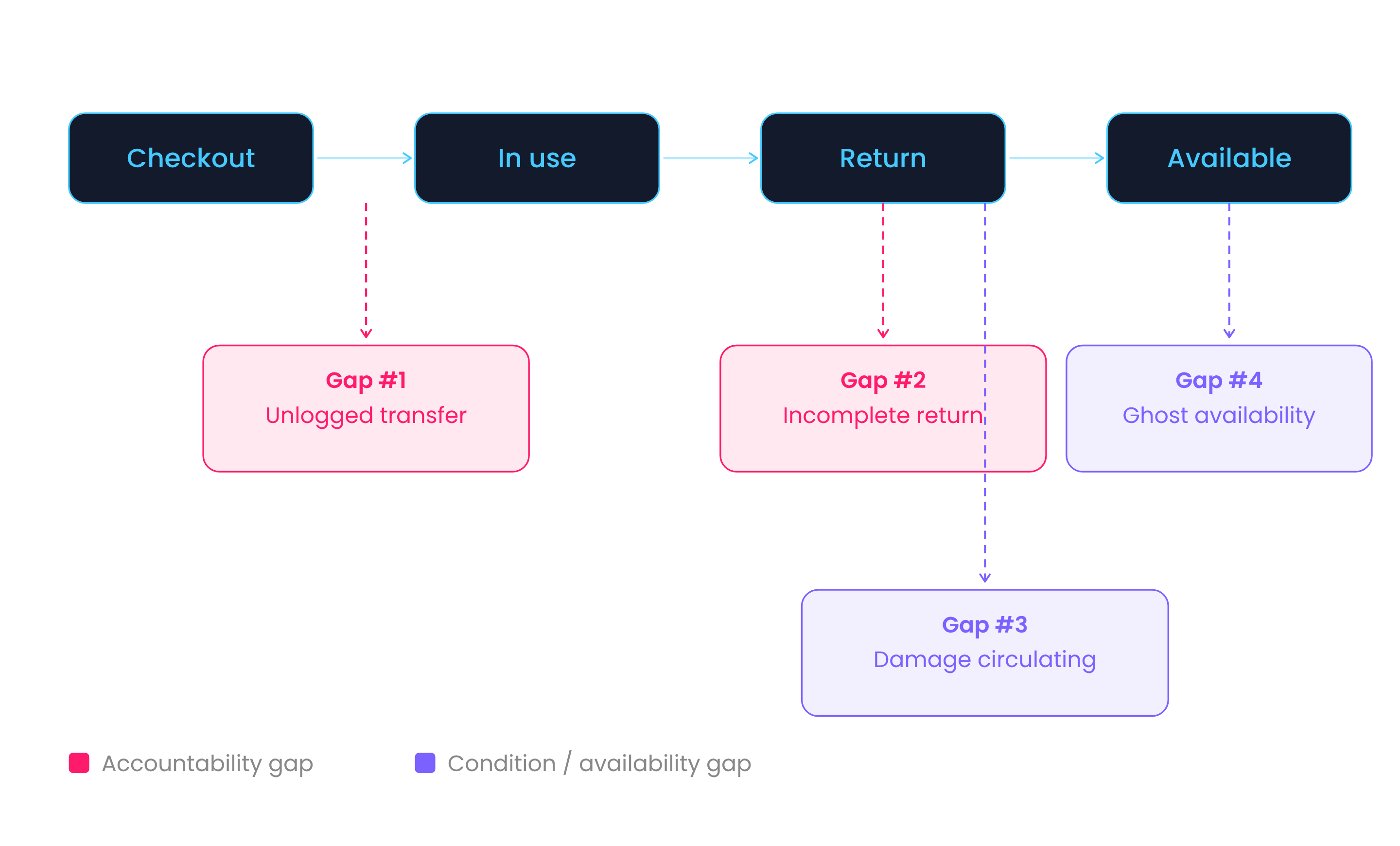
Gear most commonly goes missing at 4 specific workflow gaps: unlogged transfers, incomplete returns, damage that keeps circulating, and ghost availability. Each gap represents a moment where accountability depended on a person taking an action they did not take.
Gap #1: The unlogged transfer
A camera gets passed between 2 crew members on set. Both assume the other handled the paperwork. Neither did. The system still shows the original checkout user as responsible. When the camera is not returned on time, the trail points to the wrong person. The actual handoff is unrecoverable.
Gap #2: The incomplete return
Incomplete returns occur when a kit comes back, but something inside it is missing. The system shows the kit as returned, but no one verified what actually came back.
Without clear visibility into what's inside the kit at checkout and return, missing components don't surface right away. The gap only becomes obvious when someone tries to use the kit and finds something missing.
For a university media program running 800+ weekly checkouts, this is where the budget disappears.
Gap #3: Damage that keeps circulating
Damage circulates when a return does not include a clear condition update, or the update isn't detailed enough to act on. A microphone comes back after an event with a loose connection. Nobody flags it, or it gets marked with a vague note like "broken" with no further detail.
It gets checked out the next day, fails mid-presentation, and returns again, still unflagged or not properly documented, still available. The issue compounds through every subsequent user.
Gap #4: Ghost availability
Ghost availability occurs when an asset appears available because it was never properly checked out. Someone grabbed it informally, planning to log it later. Later does not come. Another person books it, shows up for it, and it is not there. In production environments, broadcast departments, and corporate AV teams, one availability gap stalls an entire project.
What Separates Equipment Management Software from IT Asset Management Tools
Equipment management software is built for assets that move constantly between multiple users on overlapping schedules. IT asset management software (also called IT asset management tools or ITAM) is built for static, long-term assignment (one asset, one user).
The two categories serve different operational models.
IT asset management tools track a laptop assigned to an employee for a year. A workstation tied to a desk. That model works when the gear doesn't move. It breaks down the moment equipment starts cycling between multiple people on overlapping schedules.
Purpose-built equipment management software is designed around the opposite assumption: assets don't stay static. They may move constantly between users on tight timelines or be assigned to a single person for longer periods with clear ownership.
In both cases, every step of that usage needs to be captured without requiring extra effort from the people doing the moving.
Reservations, checkouts, condition flags, and maintenance status all automatically update the same availability view in real time.
5 Equipment Management Platform Features That Close Accountability Gaps
Not every system that calls itself equipment management software is built for shared, high-velocity asset environments. Here's what actually matters when you're evaluating whether a platform will hold up under real operational load.
1. Real-Time Equipment Tracking Across Teams
Real-time tracking shows exactly who has an asset, where it is, and when it is expected back. A production team running multiple shoots can see that a camera is currently assigned to a specific operator and is due back at 4 PM, which allows another team to plan around that return time instead of assuming availability. This level of visibility removes guesswork and prevents assets from going missing between handoffs.
2. Barcode Tracking and Asset Tagging Systems
Barcode tracking standardizes how assets are checked in and out by replacing manual entry with scanning. In a university equipment room, a student scans a camera and its accessories at checkout, and scanning again at return confirms that every item in the kit is accounted for.
Missing components can be flagged during checkout and return, especially when teams set up component-level tracking as part of their workflow. This helps reduce loss caused by incomplete returns or unrecorded movements.
3. Reservation and Checkout Controls
Reservation systems define who is using equipment and when, and can include role-based permissions that control who is allowed to book specific gear. This prevents overlapping bookings, untracked usage, and ensures the right equipment goes to the right people.
An AV team booking lighting equipment for an event next week can reserve those assets in advance, and the system blocks other teams from selecting the same gear during that time. This ensures that equipment is not double-booked or taken without being assigned.
4. Maintenance and Asset Status Integration
Maintenance tracking connects asset condition directly to availability. When a piece of gear is flagged for maintenance, it disappears from bookable inventory immediately. The flag and the availability block are the same action, not two separate updates in two separate systems.
5. Audit Trails and Usage History
Audit trails record every interaction with an asset, including checkouts, returns, transfers, and condition changes, creating a complete history of usage. Checkout records can also include digital agreements or e-signatures, which tie each transaction to a specific user with a clear record of responsibility.
When a piece of equipment goes missing, the team can review its history to see who last checked it out, when it was returned, and whether it was transferred to another user.
How to Evaluate Equipment Management Software for Shared Asset Environments
When choosing equipment management software for shared asset environments, evaluate 4 criteria: support for frequent handoffs, unified availability, real-time updates, and multi-location scalability. A platform missing any of these will still produce accountability gaps.
Use this checklist before committing to a platform:
Frequent handoffs
Does the system support checkouts, transfers, and returns as everyday operations — not edge cases?
Unified availability
Do reservations, active checkouts, and maintenance flags all update the same view at the same time?
Real-time updates
Does availability reflect the current state of every asset without manual refresh?
Multi-location scalability
Does the system maintain the same visibility across multiple teams, departments, and sites?
Scan-based workflows
Does checkout and return happen through scanning — not manual form entry?
A platform that still depends on manual entry for any of these steps is a better-looking spreadsheet, not a structural fix.
Build Accountability Into Your Equipment Operations
If your team is confirming availability by walking to the equipment room, resolving booking conflicts over Slack, or chasing returns by text — the system isn't doing its job. You've relocated the accountability problem into your team's daily coordination overhead, and it will keep finding ways to surface.
The gear loss stops when the system is built, so that accountability doesn't require a decision. Every checkout is logged at the point of action. Every return is scanned. Every flag reflected in availability immediately. Every transfer recorded.
That's not a stricter version of what you already have. It's a different approach entirely.
Check how Cheqroom builds accountability into shared equipment workflows.