CMMS Software A Guide for Beginners
Remember the last time the office printer broke? A flurry of emails, a forgotten sticky note on the machine, and maybe three different people calling for service. This kind of chaos is common when things need fixing, whether it’s a rattling air conditioner or a flickering light. But what if there was a calm, organized way to manage it all?
That's where a special kind of tool called CMMS software comes in. The acronym stands for Computerized Maintenance Management System, which sounds far more complicated than it is. In practice, think of it as a digital command center for everything that needs fixing, ensuring no task ever falls through the cracks again.
A Computerized Maintenance Management System is exactly what it sounds like. It’s Computerized, meaning it’s modern software, not a pile of paperwork. Its focus is on Maintenance, which covers both emergency repairs and proactive care. Finally, it’s a Management System because it organizes the entire process, from the initial request to the finished job.
The system replaces the messy mix of spreadsheets, emails, and lost notes that so many businesses rely on. Instead of scattered information and forgotten tasks, this single system provides a central, reliable place for all your maintenance management. It’s the modern answer to the age-old problem of keeping things running smoothly.
The Super-Powered Sticky Note: How to Tame Chaos with Work Orders
When the office coffee machine goes down, it often triggers a flurry of emails, a hopeful sticky note, and a lot of caffeine-deprived frustration. When there’s no official system for reporting problems, this kind of confusion is the default, and important repairs often slip through the cracks.
To fix this, CMMS software uses a simple but powerful tool: the work order. Think of it as a digital request form or a super-powered sticky note that can’t get lost in an inbox. It’s the formal way for anyone in the organization to say, "Hey, this is broken and needs to be fixed," and know that the message was received.
A work order does more than just report a problem; it organizes the solution. It captures the three essential pieces of information in one tidy package: exactly what is broken (the espresso machine’s grinder), where it’s located (the third-floor kitchen), and how urgent the repair is. This ensures a jammed fire door gets attention before a squeaky hinge, creating a clear process for the maintenance team to follow.
Suddenly, every request has a digital paper trail, and nothing gets forgotten. This simple step is the foundation of effective facility maintenance management, turning a reactive scramble into an organized response. But tracking a single repair is only half the story. What if you need to know if this is the third time that specific coffee machine has broken this year?
Giving Your Equipment a "Medical History": What Is Asset Tracking?
Answering whether the coffee machine has broken for the third time this year is where a CMMS moves beyond being a digital to-do list. To do that, the system needs to know that the “third-floor coffee machine” is a specific, individual item. This is where the concept of asset tracking comes in, and it's simpler than it sounds.
In the world of maintenance, any important piece of equipment you want to keep tabs on is called an asset. It could be a delivery van, an HVAC unit on the roof, a specific laptop, or that troublesome coffee machine. Asset tracking and management is the process of giving each of these items its own digital file inside the CMMS. Think of it as creating a permanent medical record for every important piece of equipment you own.
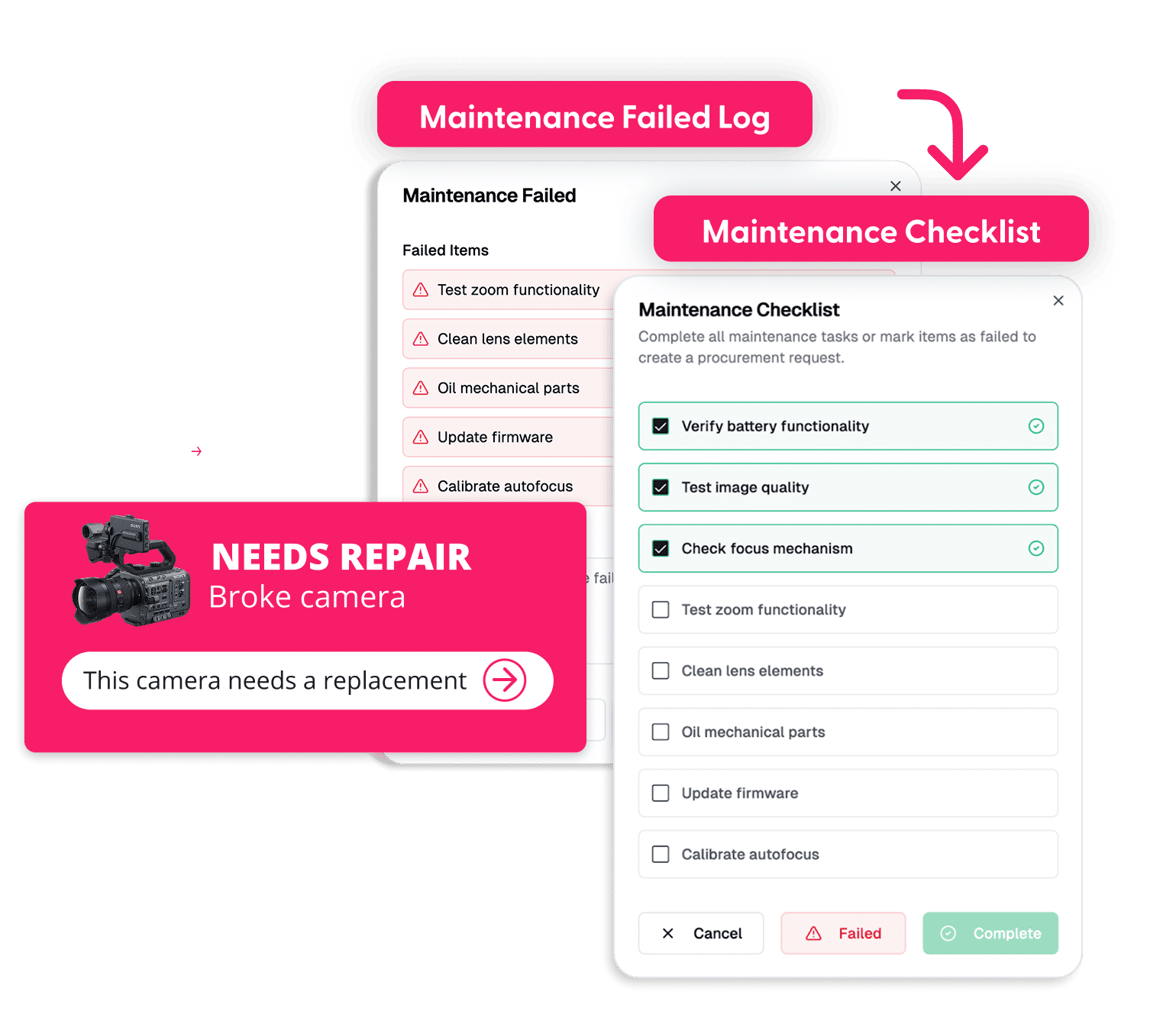
This digital record becomes the home for every work order ever associated with that asset. Now, when a repair is needed, you can pull up the item’s entire history in a second. You can see when it was purchased, review its warranty information, and scan a complete log of every past problem and repair. This is one of the core benefits of maintenance management platforms: they create a single source of truth for your equipment.
With this history, you can finally spot patterns. You might discover that one air conditioner requires service every summer while the others run perfectly, telling you it’s a “lemon” that’s costing you money. This insight allows you to make smart financial decisions, like choosing to replace unreliable equipment instead of sinking more money into constant repairs. But what if you could use this information to fix things before they even break?
Tired of digging through paper trails?
Give your high-value assets the digital home they deserve. See how Cheqroom organizes every repair, manual, and warranty in one click.

The Real Magic: How to Fix Things Before They Break
Spotting that a machine is a “lemon” is useful, but it still means you’re just responding to problems as they happen. This is called reactive maintenance—waiting for something to break and then reacting to fix it. It’s the standard way of doing things, but it often feels like you’re constantly putting out fires and dealing with unexpected emergencies.
The real magic of a CMMS is that it helps you get ahead of those fires. Instead of reacting, you can become proactive. The official term for this is Preventive Maintenance, and it’s the single most powerful idea in managing equipment. It simply means performing small, routine checks and services to prevent big, expensive failures from ever happening.
Think about your car. You don’t wait for the engine to seize to change the oil; you do it every few thousand miles to prevent a disaster. That’s preventive maintenance in a nutshell. The same logic applies to changing the filters on an air conditioner before it gets clogged or inspecting the brakes on a delivery van before they start to fail.
This is where the "computerized" part of a CMMS shines. You can set up rules for all your equipment, and the system handles the preventive maintenance scheduling automatically. For instance, you can tell the software to create a work order to "Inspect HVAC unit #2" every September, turning a complex planning job into a simple, automated reminder. It's a core function of modern facility maintenance management solutions.
By shifting from a reactive to a proactive approach, you dramatically reduce surprise breakdowns, make your equipment last years longer, and save a surprising amount of money on costly repairs. This planned, predictable world is the ultimate goal of using CMMS software. But these systems can help with more than just repairs.
Put your maintenance on autopilot.
Stop waiting for gear to break down. Set up automated recurring maintenance schedules in Cheqroom and keep your operations running 24/7.

More Than Just Repairs: Three Other Key CMMS Features in Plain English
While scheduling repairs is the heart of a CMMS, a good system offers other powerful tools that work together to make life even easier. Once you’re organizing work orders and planning preventive tasks, these features help you solve the next layer of common maintenance headaches.
Imagine a technician goes to fix an air conditioner, only to find you don't have the right filter in stock. The repair gets delayed, and everyone gets frustrated. This is where inventory control for MRO (Maintenance, Repair, and Operations) comes in. Think of it as a digital stockroom for all your spare parts. The CMMS tracks how many filters, lightbulbs, or belts you have, tells you where they are, and can even automatically remind you to reorder when supplies run low.
Furthermore, maintenance staff are rarely sitting at a desk. They're on the roof, in the basement, or out in the field. Handing them a stack of paper work orders is slow and inefficient. Modern systems solve this with powerful mobile CMMS capabilities.
A mobile CMMS puts all the tools your team needs right in their pocket.
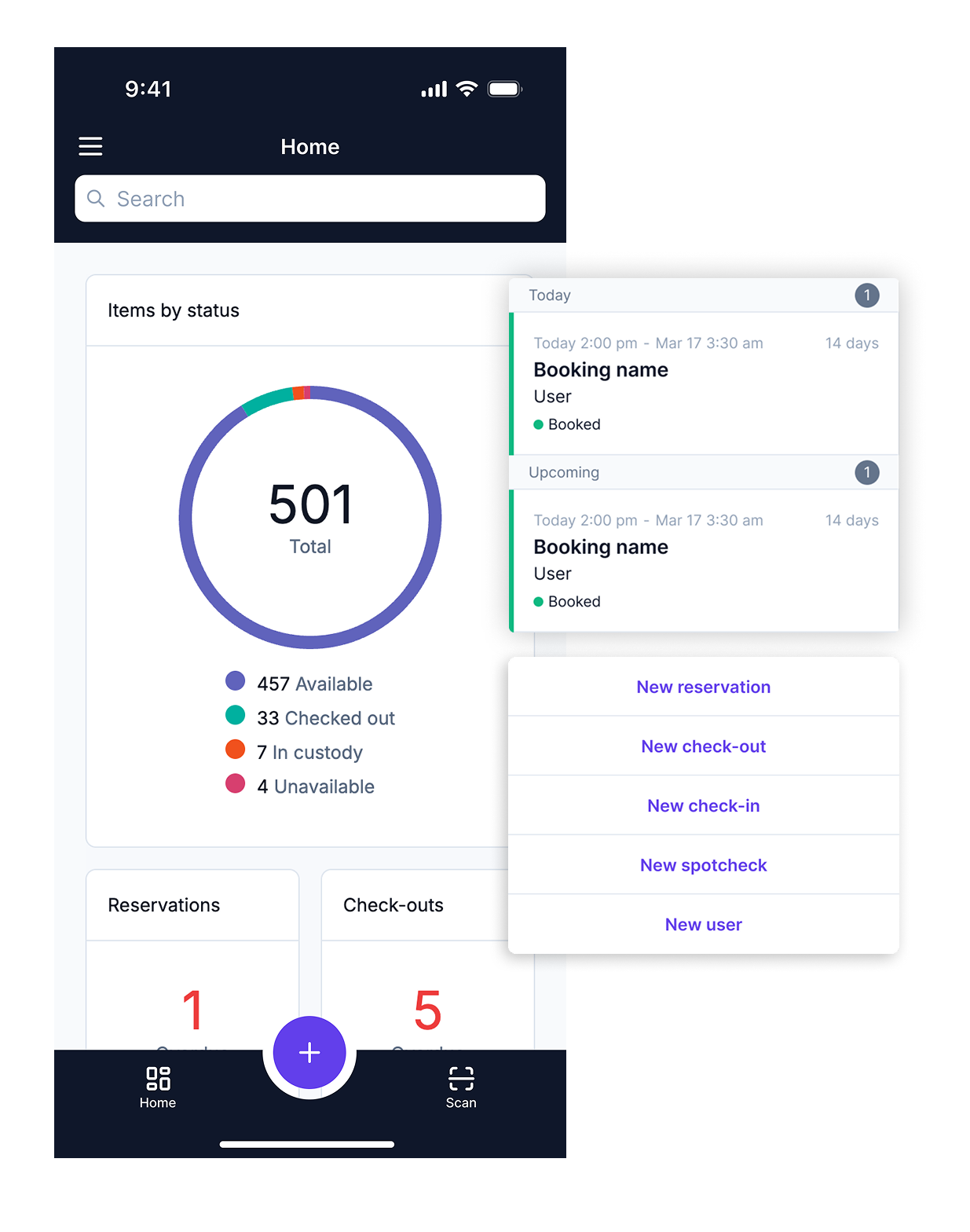
With a simple smartphone app, your team can receive new jobs, view equipment history, take photos of a problem, and mark work as complete, all while standing right in front of the machine they're fixing.
Finally, how do you know if all this effort is actually paying off? A CMMS acts like a report card for your equipment's health. By collecting data from every work order, the system can generate simple charts and summaries. This is handled by maintenance reporting and KPIs (Key Performance Indicators). It helps you answer crucial questions at a glance, like "Which machine is breaking down the most?" or "Are we spending more on repairs this year than last year?"
These elements transform a CMMS from a simple to-do list into a true command center for your entire maintenance operation:
- Inventory: Your digital stockroom for spare parts.
- Mobile Access: Your maintenance hub in your pocket.
- Reporting: A clear view of your biggest problems.
Now that you have a clear picture of what these systems do, the next question is often about how they are delivered.
Renting vs. Owning: Cloud-Based vs. On-Premise CMMS
Fundamentally, there are two main paths for how CMMS systems are delivered, and the choice between them determines where your software and data actually live: in the “cloud” or on your own computers.
The easiest way to think about the difference is to use a housing analogy. A cloud-based CMMS is like renting an apartment. You pay a predictable monthly subscription fee, and the software company (the landlord) handles all the backend work—security, updates, and server maintenance. You can access it from any device with an internet connection. This model is also known as Software-as-a-Service, or SaaS.
On the other hand, an on-premise CMMS is like owning a house. You typically pay a large, one-time cost to buy the software license outright. However, you are then responsible for everything. You have to install it on your own servers (the foundation), manage all the updates (the plumbing), and handle your own data security (the locks on the doors).
This choice between cloud-based vs. on-premise CMMS comes down to a few key trade-offs. The cloud option offers lower upfront costs, greater flexibility, and frees you from needing a dedicated IT team to manage it. For these reasons, it has become the standard for most businesses. An on-premise system provides more direct control but requires a significant investment in both money and technical staff. This route is typically only taken by large organizations with highly specific security needs.
For a small operation, however, are both of these options overkill? Can simple alternatives, like a spreadsheet, be a good enough starting point?
Is a Spreadsheet Good Enough? CMMS vs. Manual Tracking
For many operations just starting to organize their repairs, a spreadsheet seems like a logical first step. It’s familiar, flexible, and essentially free, making it one of the most common top cmms alternatives. You can create columns for the equipment name, the problem, and the date it was fixed. For a one-person shop, this might work for a while. But what happens when things get even slightly more complex?
The trouble with spreadsheets begins with their reliance on perfect, manual data entry. A single typo can make a record impossible to find later. If someone accidentally deletes a row or forgets to update a status, that information is simply gone. There are no built-in safeguards to ensure data is consistent or complete. In contrast, a cmms software uses structured forms, dropdown menus, and required fields, creating a reliable history that isn’t vulnerable to simple human error.
Beyond data integrity, a spreadsheet is fundamentally a passive list; it can’t do anything for you. It can’t automatically send an email to a technician when a new job is assigned. It can’t pop up a reminder that a vehicle is due for an oil change. This automation is one of the core benefits of maintenance management platforms. They actively work for you by scheduling preventive tasks and handling communication, turning a static list into a dynamic assistant.
This problem multiplies when a team is involved. When multiple people use the same spreadsheet, you run into the classic issue of version control—who has the most up-to-date copy? A repair might get done, but if it isn’t logged in the “master” file, it’s like it never happened. A CMMS solves this by acting as a single source of truth that everyone can access and update in real-time, from any device. As your needs grow, you may even encounter more advanced systems.
What's the Difference Between CMMS and EAM?
As you look into maintenance tools, you may see "EAM" mentioned alongside CMMS. EAM stands for Enterprise Asset Management, and while it’s related to a CMMS, it has a much broader, more financial focus.
The easiest cmms vs eam comparison is to think about owning a car. A Computerized Maintenance Management System is like your trusted mechanic. Its entire world revolves around keeping the car running smoothly—scheduling oil changes, managing tire rotations, and tracking repair history. Its primary goal is performance and reliability. In contrast, an EAM system is like the dealership’s finance office. It tracks the car's original purchase price, its depreciation over time, insurance costs, and ultimately helps decide when it’s financially smarter to sell the car than to keep repairing it.
EAM systems are massive, complex tools that look at an asset's entire financial lifecycle, from purchase to disposal. The asset tracking within a CMMS is focused on operational health and maintenance history. For organizations looking to get chaos under control and prevent breakdowns, a CMMS is the direct, purpose-built tool for the job.
How to Start Looking for a CMMS (Without Getting Overwhelmed)
Finding the right CMMS can feel like an impossible task. A quick search reveals a dizzying world of feature lists, technical specs, and pricing models. Instead of diving into that chaos, you can prepare yourself by answering a few simple questions first. This approach helps you create a filter, ensuring you look for a tool that solves your problems, not just one with the longest list of features.
Before you look at a single piece of software, grab a pen and paper and work through these three steps:
- List Your Top 3 Maintenance Headaches. What drives you crazy? Is it lost sticky notes? Not knowing who was supposed to fix the leaky faucet? Or constantly buying the same spare part because you can’t find it? Be specific.
- Pick Your #1 "Must-Solve" Feature. Look at your list of headaches. If you could only solve one, which would it be? This identifies your core need. If lost requests are the top issue, your must-have is "simple work orders." If you're managing a few vehicles, maybe it's "basic vehicle maintenance scheduling."
- Search by Your Business Type. Now you can start looking. But instead of a generic search, be specific. Try searching for the best cmms for small business, "maintenance software for restaurants," or "CMMS for property management." You’ll find tools built for your world.
This process shifts your focus from what a system can do to what you need it to do. By defining your biggest pain point first, you ensure that the software you ultimately choose will provide immediate, genuine value to you and your team.
From Chaos to Control: What You've Learned About CMMS
Remember the world of lost sticky notes and forgotten repair requests? That initial feeling of chaos is no longer a mystery. You have journeyed from seeing maintenance as a series of frustrating emergencies to understanding it as a system that can be managed with calm, deliberate control.
You can now see the simple, powerful ideas that create that control. A work order transforms a vague complaint into a clear, trackable task. Asset tracking acts as a "medical history" for every important piece of equipment. And with the logic of preventive maintenance, you’ve grasped the magic of moving from fixing what’s broken to preventing things from breaking in the first place.
To appreciate the real benefits of maintenance management, start by simply observing. The next time you see an "Out of Order" sign, ask yourself: Was this preventable? Thinking this way is as simple as noticing the difference between a frantic fix and a scheduled repair. Each time you do, you'll build confidence in your new understanding.
You no longer just see a flickering light or a rattling machine; you see a system waiting for order. That’s the real transformation—understanding that maintenance isn't just about reacting to problems. It's about proactively creating a more reliable world where the things we depend on are ready when we need them.

Ready to move from chaos to control?
Don't let your maintenance management stay stuck in a spreadsheet. Join thousands of teams who use Cheqroom to extend asset lifespans and reduce downtime.

Meet Maria Fernanda Benitez, our Marketing Specialist driving Cheqroom’s voice and performance. Mafe blends creativity with data, shaping content, managing social media, and supporting operations while keeping a close eye on what actually works.
She has a natural instinct for trends and performance and loves turning insights into smarter decisions. Her favorite part? Brainstorming, optimizing, and making every idea count.
More blog articles